![Ivet-Logo_1 (2).png]](https://studentportal.ivet.edu.au/hs-fs/hubfs/Ivet-Logo_1%20(2).png?height=40&name=Ivet-Logo_1%20(2).png)
Once you have successfully completed a course and your USI number has been verified as valid, IVET will issue your Certificate within 30 days.
Once your Certificate is available, a notification will be sent to your registered email address, so please ensure your contact details are accurate at the time of enrolment.
The Certificate will also be available to your Trainer and school's VET Coordinator.
View and Download your Certificates
Follow the steps below to view and download your Certificate from the Portal.
-
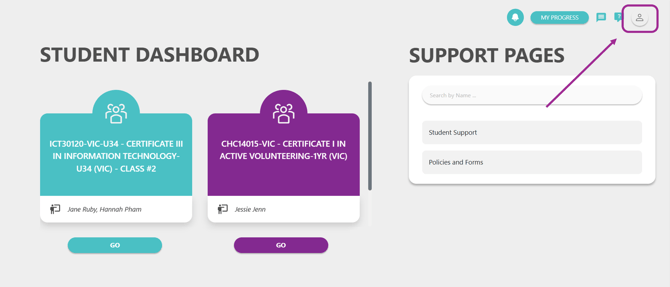
Firstly, log in to your portal account. Then from your Student Dashboard, click on the Profile icon at the top right corner of the page.
-
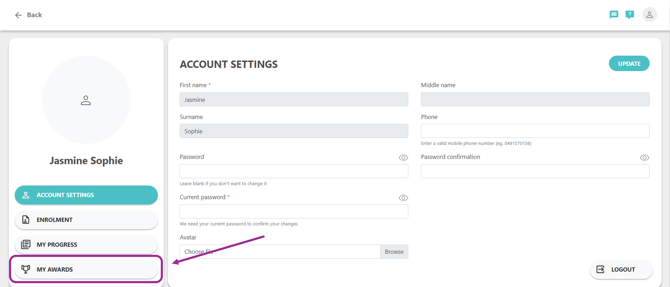
You will be directed to the Profile section. Next, click on the My Awards tab to view all your issued Certificates:
-
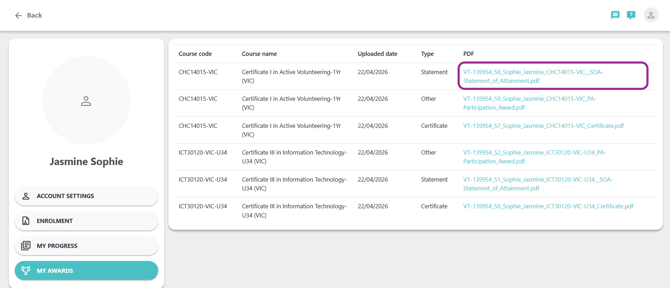
The My Awards page is where you can access all the current awards you have attained through your training with IVET, including Certificates, Statements of Attainment (SOA), and other issued Awards.
Simply click on the certificate PDF link to view and download your certificate.
Notification of Certificate Availability
You will receive an email notification whenever a new certificate becomes available in the Portal. This email will be sent to your registered email address as shown below. This notification will also be sent to your Trainer and school's VET Coordinator.
To access your award, simply click on the link provided in the email, which will navigate you directly to the My Awards page.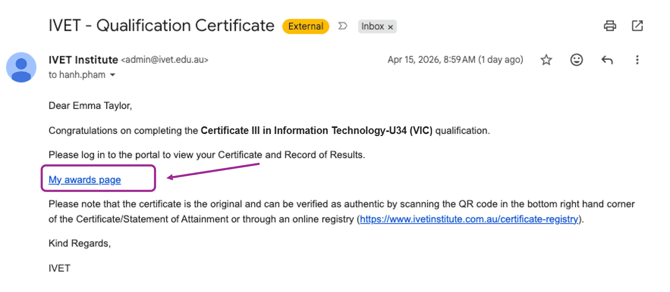
Common Questions & Support
Have a question or experiencing an issue? Check out our frequently asked questions below, or get in touch with IVET to request further assistance.
Note: Certificates issued prior to 2026 are not available via the Portal.
-
Unable to access the certificate link in the email?
Please ensure you are logged into the Portal before clicking the certificate link. Once logged in, try clicking the link in your email again.
-
Completed your course but the certificate is not available?
First, ensure all your units have been completed and check with your Trainer that all results have been finalised.
Is it too soon? it can take up to 30 days from the completion of your final unit for your certificate to be issued.
Is there a problem with your USI? - your USI must be verified and valid before a certificate can be issued. If you have not provided a verified USI, this will need to be resolved before you can access your certificate.
-
Require further support for certificate issuance?
Firstly, a reminder - before submitting a request, please ensure your USI is valid.
If you still need help:
- You can email admin@ivet.edu.au
- In the subject line, add: Certificate Request - [Your Full Name]
- Please include the following information:
- Your Full Name (as it appears on your USI)
- Your Class ID (located on your Student Portal)
- The Name of the Course you completed
- Your USI Number (Unique Student Identifier)
If you have any other questions or encounter any difficulties, please do not hesitate to contact us at admin@ivet.edu.au.